Thanks for signing up for email updates.
I JUST SENT YOU AN EMAIL
I just sent you an email asking you to confirm your email address before I start sending updates. You must confirm your email address before I start sending email updates.
Looking For Instant Announcements and Trades?
Twitter Is Instant: For immediate updates join my twitter feed through this link. If you have a twitter account you can also ask me questions throughout the day. Remember that emails are slow and are sent 2 or 3 times during the day. Twitter is as instant as you can get.
How To Insure You Get My Emails
To make sure you receive my emails and they don’t end up in your spam folder, please add my email teddiknight@fullyinformed.com to your contact list or if you are using Microsoft Outlook, add my email address to your safe senders list (see below).
Using Outlook?
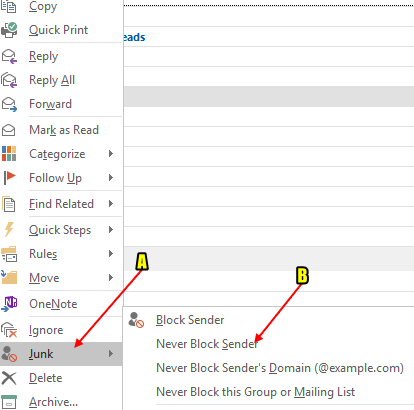
To make sure you receive me emails, go to the email I just sent you, right click on the email and select the junk command and NEVER BLOCK SENDER from the submenu. That will add my email address to your safe senders list and keep them out of your spam folder.
Using Gmail?
If using gmail, you should add my email address to your address book.
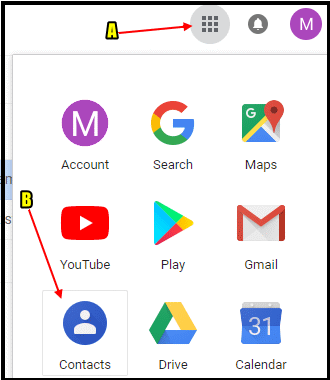
Step 1: To do this, go to the top right corner of your web browser and select the APPS icon (marked A). From the pop up window, select the CONTACTS icon (marked B).
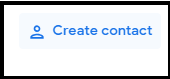
Step 2: From the contacts page that opens showing all the contacts you have in your list, select CREATE CONTACT.
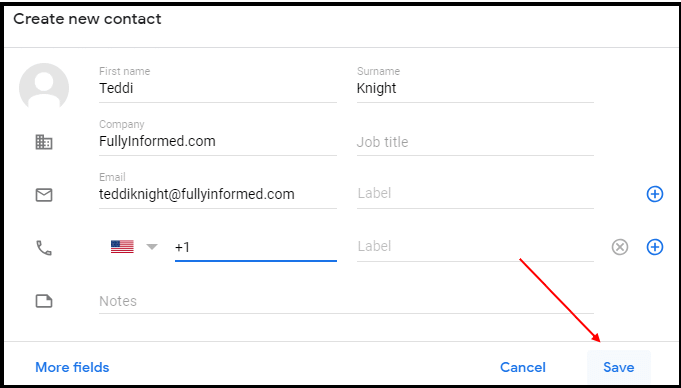
Step 3: Fill out the contact form with my name and email address and then select SAVE. From that time forward you should receive my emails.
Still Not Receiving My Emails?
If after doing these steps you still do not receive my emails in your gmail account, follow these steps to check your spam folder.
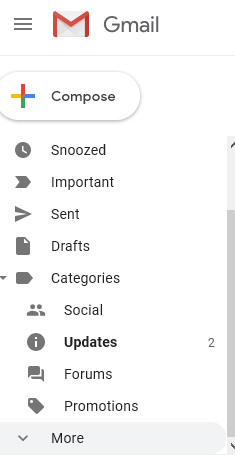
Step 1: Go to your gmail menu, far left side of your web browser. If you do not see your SPAM folder, select the MORE drop down to find the SPAM folder.
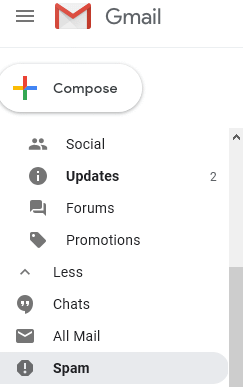
Step 2: Once you find the SPAM folder, select it to open all emails caught as spam.
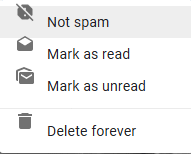
Step 3: Find the email(s) I have sent and right click on the email. From the pop up menu, select NOT SPAM and the email will be removed from your SPAM folder and placed in your INBOX. This should white list all future emails sent to you. If in the future you once again stop receiving emails, make sure to check your SPAM folder once again.